Thursday, December 18, 2008

PCWin Speaker Record

FrontierDG - computer software
PCWin Speaker Record - records everything you hear from your speakers. Save as mp3 or wav files. Records at 128 Kbps CD quality. Now you can enjoy your music and podcast anytime!

Record from Internet radio stations. Grab audio from any web site, podcast, Internet Radio, DVD or CD as it plays.

Easy-to-use. Select mp3 or wav file format. Click 'Start Recording' and when you are ready to stop recording press 'Stop Recording' button. Then save your newly created mp3 or wav file and play it anytime!

Play your saved recording with Microsoft media player, Video Lan, WinAmp or any media player! It so easy, no complicated settings, just great CD quality 128 Kbps mp3 or wav files everytime.

Get PCWin Speaker Record now, click the here to download now.

PCWin Speaker Record requires the MPEG Layer 3 Audio Encoder... download here and run the installer.

Tuesday, December 16, 2008

WhoCrashed : WhoCrashed reveals the drivers responsible for crashing your computer

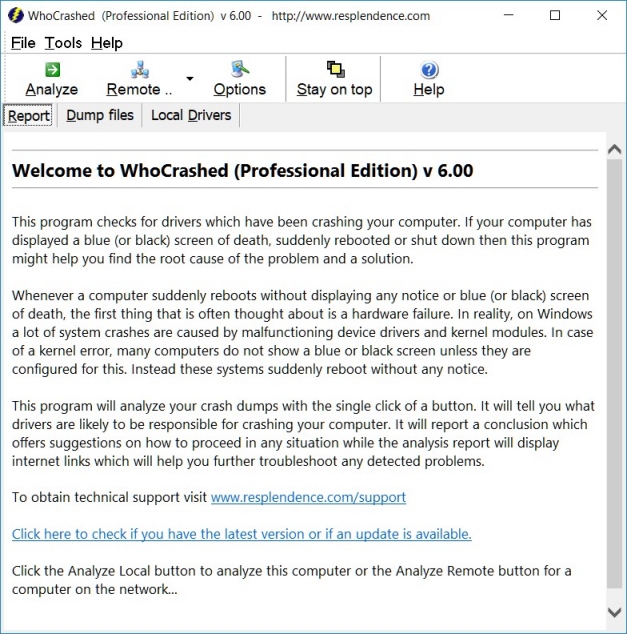
WhoCrashed reveals the drivers responsible for crashing your computer

Whenever a computer running Windows suddenly reboots without displaying any notice or blue screen of death, the first thing that is often though about is a hardware failure. In reality, most crashes are caused by malfunctioning device drivers and kernel modules. In case of a kernel error, most computers running Windows do not show a blue screen unless they are configured to do so. Instead these systems suddenly reboot without any notice.

WhoCrashed shows the drivers which have been crashing computer with a single click. In most cases it can pinpoint the offending drivers which have been causing misery on your computer system in the past. It does post-mortem crashdump analysis and presents all gathered information in a comprehensible
way.

Normally, debugging skills and a set of debugging tools are required to do post-mortem crash dump analysis. By using this utility you do not need any debugging skills to be able to find out what drivers are causing trouble to your computer.

Note

Note that WhoCrashed cannot be 100% sure about the driver which is responsible for crashing your computer. Because all kernel modules run in the same address space, a kernel module is able to corrupt another. Also, a driver may be able to cause problems to another driver which runs in the same device stack. So keep in mind this software is not guaranteed to identify the culprit in every case but most often it does.

WhoCrashed relies on the Windows Debugging Package (WinDbg) from Microsoft. If this is not installed, WhoCrashed will download and extract this package automatically for you.

Download

Screen shot

Sunday, December 14, 2008

Script Zombie

Batch files and scripts are crucial tools for Windows Systems Administrators. Think of the last time that you needed to touch multiple systems in your Windows infrastructure. If you were lucky it involved running a script pulling workstation names from a text file–worse, it could have involved visits to individual systems. Here lies the problem, the traditional scripting functionality in Windows is robust but the limitations start becoming obvious when you involve multiple remote systems.

Enter Script Zombie. This powerful tool, provided free of charge by Nerdcentric Software, allows for advanced functions like spawning a script to 10 remote systems at once. The ability to check network connectivity, pull system information, restart systems, remote desktop, and even check the event viewer on a single or many systems with a few clicks. All of these features without needing a client installation on the remote machine.

Don’t have a current list of the systems on your network? Script Zombie will quickly scan your network and populate the host list for you.

Are you a scripting genius? Script Zombie will pass hostnames to your scripts making site tailored functionality a breeze. To be sure the batch job is completed quickly; the Zombie Engine first checks a remote system verifying it’s online. The Zombie also includes Script Timeout functionality to gracefully end a stalled process.

Script Zombie includes a few sample scripts to get you started and be sure to take advantage of our message forums. Not only as a reference to get help with scripting questions, but also to share cool ideas with colleagues.

With its vast feature set, Script Zombie is a fantastic tool that further empowers a skilled Systems Administrator.

New with version 0.83

  • Added a File Menu and Toolbar option to create a new host list.
  • Corrected two logging issues (descriptions missing).
  • Updated two icons to better depict their function.

New with version 0.81

  • Now with improved graphics look and feel thanks to the art work of TheDarkCloak.com
  • Zombie engine now supports .VBS scripting
    • Automatically switches to using CScript when a .VBS script is loaded
    • sComputer = WScript.Arguments.Item(0) <–Sample passing of the hostname to s VBS script
  • Script Zombie now has the ability to spawn up to 25 tasks simultaneously
  • Editor can be set for the hostname and script editing functions (I suggest Notepad++)
  • Added ability to automatically spawn a monitor process when a script is running.
    • Bug was corrected with the monitor process that would cause a loop if too many systems were offline at once.

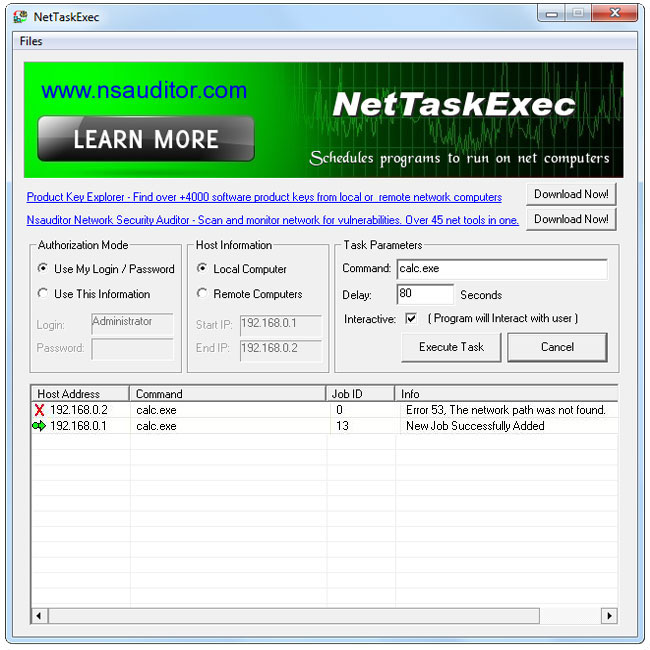
NetTaskExec schedules programs and commands to run on local or network computers

NetTaskExec schedules programs and commands to run on local or network computers in the near future. You must have administrative privileges on the network computer and schedule service must be running in order to execute a command or computer program. All the mentioned features are provided with a user friendly graphical interface.

Download

Friday, December 12, 2008

FBackup 4.0 free backup software

Backup software

FBackup4.0 has a simple interface and guides you through the process of defining a backup job using a friendly wizard that asks you:

  • Where do you want to store the backup (the destination).
  • What do you want to backup (the sources).
  • How do you want to run the backup (using full backup that zips the files, or mirror backup that doesn't zip them).
  • When do you want to run the backup (you can schedule it to run autmatically or run it manually).

Once a backup job is defined you can run it manually by pressing the Backup button (or F6), or if you added a scheduler it will run automatically. FBackup can easily back up sources from local drives (including USB connected drives) to destinations such as USB/Firewire connected devices or mapped network locations. It creates either standard zip files (when using the full backup type), or exact copies of the original sources without any compression (using the mirror backup type).

Main Features

It’s free (as in speech, not beer).
FBackup is a backup software free for both commercial and personal use. This means that you can save some money by not having to buy another backup program.

Automatic backups.
You define a backup job, set it to run automatically, and forget about it. FBackup will automatically run the backup at the scheduled date, so you have the benefit not only of having your data protected, but you'll also save precious time.

Backup with standard zip compression.
When using the full backup type, the sources will be archived using standard zip compression. FBackup uses ZIP64 compression, which means that it can create zip files over 2GB in size. Furthermore, you can protect the zip file by requiring a password for extracting data from it.

Exact copies of files.
If you don't want to have the files stored in one zip file, FBackup can make exact copies of the backup sources. Since FBackup will also back up empty folders, you can use this backup type to create in the destination a "mirror" copy of the original files.

Run actions before/after backup.
For each backup job you can define an action to execute before or after the backup. As an example, you can set a "Clear backup" action before the backup runs, so that all the previous backed up files will be clearead before loading the new ones. As an after-backup action, you can set it to stand by, log off, hibernate or even shut down the computer once the backup successfully finished.

Easy to use.
The two main functions of a backup program are the backup and restore operations. FBackup makes them easy for you, by offering friendly wizards. You start a new backup wizard, select what, where, how and when to backup, and the backup is ready to run. If you have to restore files, you'll open a restore wizard and it will ask you where you want the files to be restored.

Automatic updates.
FBackup automatically checks for updates weekly, so you'll know when a new version is released. The option to check for updates can be disabled, but we recommend to let it enabled so that FBackup will be up-to-date.

Multiple backup destinations. By default the location where your backups will be stored is the local windows partition. To be sure you have a secure backup, you'll need to store the backups on other destinations supported by FBackup (such as an external USB/Firewire drive, or on a mapped network drive). This way, if your computer would suffer a hardware failure, you'll have your data safe on an external location.

Backup plugins.
You can load plugins for backing up or restoring specific programs' settings or other custom data (like game saves, email data, etc.). Once loaded in FBackup, these plugins will add in the Predefined Backups list the sources needed to be backed up for that particular program. You can see a list of all the available backup plugins here: Free Backup Plugins.

Backup open files.
If a file is in use by another program at the time of the backup, FBackup will still be able to back up that file, because it uses the Volume Shadow Service that Windows provides. So, as long as you're on Windows XP, Windows Vista, Windows 2003 Server or Windows 2008 Server, FBackup will back up those open files. As an example, you will be able to back up your Outlook emails and settings without closing it first.


FBackup is a free file backup software, it is not recommended for full system backups (image backups).