Great tool to use with your ESX or ESXi server. Trilead VM Explorer. You can use this tool to access and manage your VMs and also to execute backups manually. The differenc In the paid version is that you can use SAN, do a scheduled backups, having a real support, and have more than 5 ESX servers. Also you are able to have nice daily html repports sended via e-mail.
So what do you need to do to correctly access your ESX Server with VM Explorer:
1.) Go to the console or with your KVM and press ALT+F1, enter “root” as a user and password you assigned when you first installed the ESX Server.
2.) Then create a new user without privileges. I created user vladan (for example).
type “useradd -m vladan” and “passwd yourpassword” (must be complex enough)
3.) Then open putty (I use putty portable) and connect with user vladan and your password created for this user when you were on the console.
Then just type “su -” (to became root. You’ll be asked for a root password). Type it in.

4.) Then go and open VM Explorer > go to Help. And you choose Enabling SSH access to the ESX 3.0/3.5 Service console. You can choose the root user if you are not about a security issues.
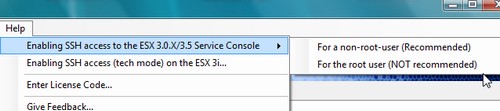
5.) Then just copy a line as on the image bellow.
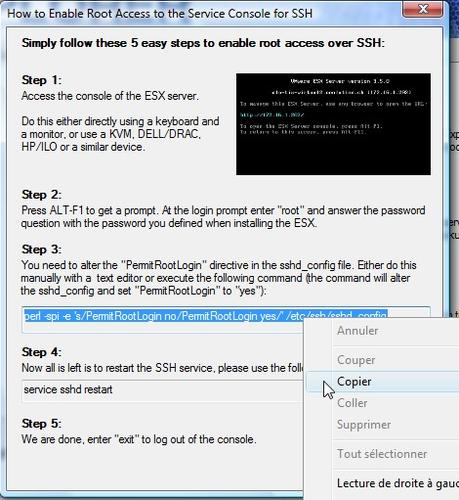
6.) And click right into your putty windows to paste (see, just right click is enough….. ) and hit enter. You enabled root access via SSH.

7.) Then you need to type in the putty window the command “service sshd restart”. To restart the SSH service (sshd - ssh daemon)

And you are DONE!! You can now Add your server to the VM Explorer and start to use this software.


No comments:
Post a Comment